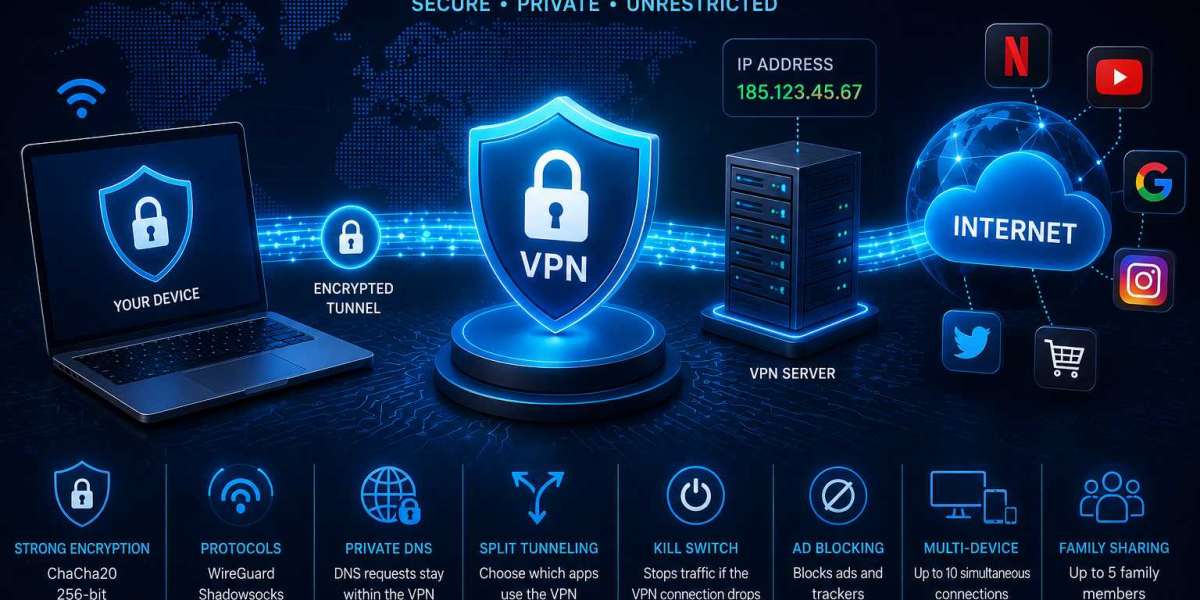

Opening a website feels immediate: enter an address, wait briefly, and the page appears. Behind that simple action, however, the connection passes through several technical stages. DNS helps locate the destination, network infrastructure carries the request, and the destination receives information about the incoming connection. A VPN changes this sequence by inserting an encrypted route and a remote server into the path. Understanding these stages separately makes it easier to see where different VPN functions actually fit.
The Connection Starts Close to the Device
Before internet traffic reaches any remote service, it must pass through the network currently being used. At home this may be a personal router, but the same device could later connect through a hotel, coworking space, airport, or another shared network.
With a VPN enabled, traffic destined for the internet is first directed through an encrypted tunnel. The VPN available at https://toggle.org/ uses 256-bit ChaCha20 encryption, while WireGuard and Shadowsocks are among its supported protocols. Encryption protects information traveling through the tunnel, whereas protocols determine how the protected connection is established and transported.
Keeping these functions separate is useful when considering network privacy. A protocol is not simply another name for encryption, and an encryption algorithm does not determine every aspect of connection behavior.
Domain Requests Come Before Many Connections
People navigate the web using readable domain names, but internet infrastructure ultimately needs network addresses. DNS performs the translation required to connect those two layers.
The available VPN setup uses private DNS servers, so domain requests can be handled within the VPN environment. DNS may operate quietly in the background, yet it remains an important part of the path between a device and an online destination.
This is also why evaluating a connection only by checking its visible IP address provides an incomplete picture. IP routing and DNS handling concern different stages of internet communication.
The Server Becomes a New Intermediate Point
Once encrypted traffic reaches the VPN server, it leaves the tunnel and continues toward the requested destination. From the perspective of an external website, the VPN server's address becomes part of the visible connection instead of the device's ordinary public IP.
The infrastructure provides more than 1,400 servers distributed across several countries. Available locations include the United States, Canada, Germany, France, Austria, the Netherlands, Switzerland, the United Kingdom, Australia, and Singapore.
Choosing another server therefore changes the route and the geographic exit point used by the connection. This may be relevant when traveling or when testing how an online resource behaves from a different network location.
Residential IP addresses are available as another routing option. They resemble addresses associated with household internet connections rather than conventional data-center networks. External services may distinguish between these IP categories, although their own access rules remain independent of the VPN.
Not All Traffic Has to Follow the Tunnel
A device rarely performs just one online task. A person may be browsing the web while another application accesses a local network resource or performs a background operation.
Split tunneling allows these connections to be treated differently. Applications selected for VPN use can follow the encrypted route, while other programs remain on the standard network connection.
This can make traffic management more precise. Instead of changing the VPN state for the entire device whenever one application requires a different route, routing decisions can be applied selectively.
The feature is particularly relevant when remote internet traffic and local network activity need to coexist on the same computer.
What If the Protected Route Suddenly Disappears?
An active connection is not guaranteed to remain uninterrupted. Wi-Fi can drop briefly, a device may change networks, or connectivity can disappear while applications continue attempting to transfer data.
A Kill Switch addresses this transition. If the VPN connection is lost, it is designed to prevent traffic from automatically continuing over the normal network connection.
This function should be distinguished from encryption. Encryption protects traffic while the tunnel is active; the Kill Switch concerns the period when that protected route fails. Both influence privacy, but at different moments.
The available tools also include ad blocking, which deals with another aspect of routine browsing rather than tunnel operation itself.
Data Practices Matter After Traffic Reaches the Server
Network protection is not limited to the journey between a device and a VPN server. Once traffic reaches VPN infrastructure, another question becomes relevant: what information about that activity is retained?
The service describes a no-logs approach under which browsing activity is not tracked or stored. Its account system also operates without traditional usernames and passwords.
Client applications are available as open-source code on GitHub. This allows interested developers and technical users to examine the client-side implementation independently. Public client code does not provide visibility into every part of server operation, so software transparency and infrastructure policies remain separate areas to consider.
The Same Connection Model Can Cover Several Screens
A person's online activity may be distributed among a computer, smartphone, tablet, and television. For that reason, platform compatibility affects whether the same VPN approach can be used consistently across different devices.
Applications are available for Windows, macOS, Android, iOS, Android TV, and Apple TV, while Linux and router use are also referenced. One account supports up to 10 simultaneous connections.
Premium subscriptions additionally include Family Sharing for up to five family members. This broadens the practical setup from protecting an individual computer to managing VPN access across multiple compatible devices.
Understanding the Whole Route Gives Better Context
VPN technology becomes clearer when the connection is viewed as a sequence rather than a single feature. Traffic begins on a local network, enters an encrypted tunnel, reaches a VPN server, and then continues to its destination. DNS requests, application-level routing, interruptions, and provider-side data practices introduce additional layers.
Encryption, protocols, private DNS, split tunneling, Kill Switch functionality, and server selection each address a different point in this sequence. None provides a complete picture by itself.
Examining the entire path helps place technical specifications in context. Instead of asking only whether a VPN changes an IP address, it becomes possible to consider how traffic is protected, routed, separated, and handled throughout the connection.