
Managing employee working hours, project deadlines, and daily responsibilities can become challenging as a business grows. Manual timesheets and spreadsheets may work for a small team, but they often create unnecessary administrative work, inaccurate records, and difficulties tracking productivity. This is where the Best Time Tracking Software can make a meaningful difference. It helps businesses record working hours, monitor project progress, and understand how employees spend their time.
However, choosing the right solution requires more than comparing prices or selecting a tool with the most features. Businesses need software that supports their workflow, provides accurate reports, and makes time management easier for employees and managers. Understanding which features matter most can help you invest in a solution that supports long term business growth.
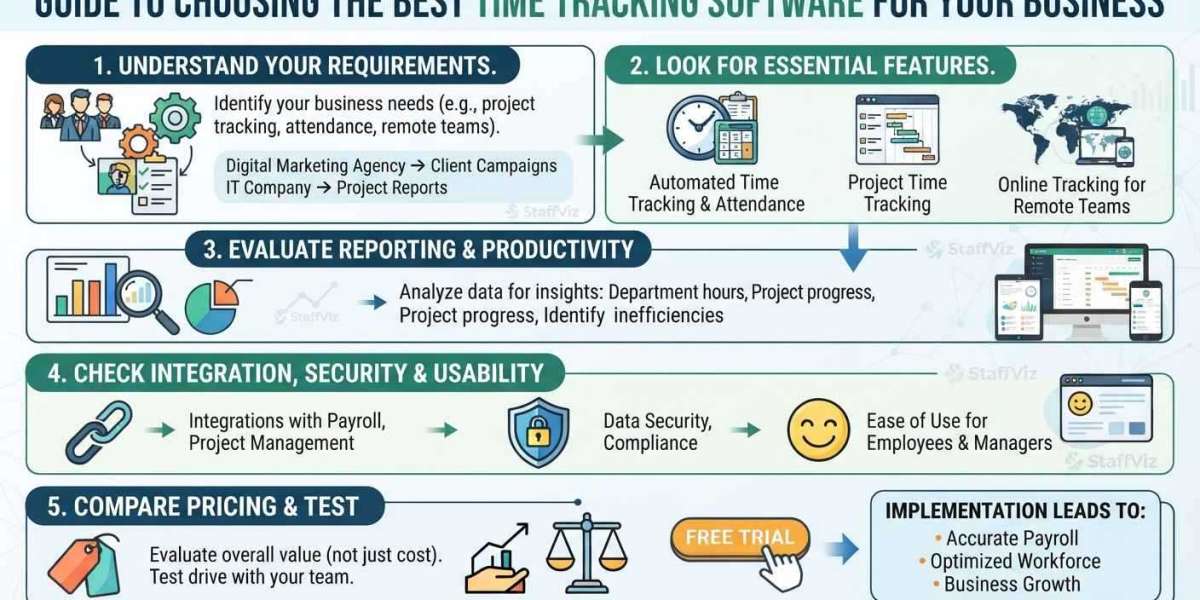
Understand Your Business Time Tracking Requirements
Before comparing different tools, identify the problems you want to solve. Some businesses need accurate attendance records, while others want to understand how much time employees spend on individual projects. Remote organizations may also need a centralized system that allows managers to coordinate teams working from different locations.
For example, a digital marketing agency may want to track hours spent on client campaigns, while an IT company may need detailed project reports to evaluate workload distribution. Defining these requirements first helps narrow your choices and prevents you from paying for unnecessary features.
Look for Essential Features in Time Tracking Software
The right software should simplify everyday operations rather than introduce another complicated process. Focus on features that support accurate time records, employee accountability, and better workforce management.
Automated Time Tracking and Attendance
Automated time tracking allows employees to record their working hours without depending on manual spreadsheets. Look for features such as clock in and clock out, break tracking, timesheets, and attendance reports. These capabilities help managers maintain consistent records and reduce mistakes associated with manual data entry.
Project Time Tracking Software
Businesses that manage multiple projects should prioritize Project Time Tracking Software. This functionality allows employees to record the time spent on specific assignments, tasks, and client projects. Managers can use the information to evaluate project costs, identify delays, and distribute workloads more effectively.
For instance, if a development project regularly takes longer than expected, time tracking reports can help managers identify which activities require additional resources or better planning.
Online Time Tracking Software for Remote Teams
An Online Time Tracking Software solution is particularly useful for businesses with remote and hybrid employees. Cloud based access allows team members to record their working hours from different locations, while managers can review attendance and productivity information through a centralized dashboard.
Choose a platform with an accessible interface, reliable reporting, and compatibility with the devices your employees already use.
Evaluate Reporting and Productivity Management Capabilities
Tracking hours is only the first step. Businesses also need meaningful reports that explain how working time is distributed across departments, employees, and projects. Detailed reports help managers identify recurring delays, understand workload patterns, and make informed operational decisions.
For example, if a team consistently spends more hours on routine administrative tasks than planned, managers can review existing processes and identify opportunities for automation. This approach makes time tracking a useful resource for improving efficiency rather than simply monitoring attendance.
Forbes Advisor's research on the best time tracking software evaluates tools using features such as reporting, remote clock in, project management, pricing, and usability. These are useful factors to consider when comparing potential solutions.
Check Integration, Security, and Ease of Use
Your selected platform should fit naturally into your existing business operations. Consider whether it integrates with payroll systems, project management applications, and other employee management tools. Compatible systems reduce repetitive data entry and make information easier to manage.
Security is equally important because time tracking platforms may store employee information and business records. Review user permissions, account protection, data handling practices, and access controls before choosing a provider. The National Institute of Standards and Technology (NIST) provides guidance on access control for cloud systems, including Software as a Service environments.
Ease of use should also influence your decision. If employees struggle to understand the interface, they may forget to record their hours or enter inaccurate information. A simple dashboard and straightforward tracking process encourage consistent adoption across the organization.
Compare Pricing and Test the Software Before Purchasing
Software pricing should match your budget and business requirements. Some providers charge per employee, while others offer monthly subscription packages with different feature limits. Instead of selecting the cheapest option, evaluate the overall value.
Consider the number of employees, available reporting features, customer support, integrations, and future scalability. A small business may initially need basic attendance tracking, but expanding operations could require project reporting and more advanced workforce management capabilities.
Take advantage of free trials or product demonstrations whenever available. Ask a few employees and managers to test the platform using everyday tasks. Their feedback can reveal usability problems and missing features before you make a long term commitment.
Why Accurate Time Tracking Matters for Business Operations
Accurate time records help businesses manage payroll, review employee attendance, and understand labor costs. They also support better scheduling and project planning by showing how much time different responsibilities require.
The U.S. Department of Labor's recordkeeping guidance explains that covered employers must maintain accurate records of employee hours and wages. Although specific legal requirements vary by location, maintaining reliable time records is an important business practice.
Businesses can explore StaffViz to understand how employee time tracking and productivity management capabilities can support organized workforce operations. Choosing a platform that brings essential tracking and reporting functions together can make daily management more efficient.
Conclusion
Choosing the Best Time Tracking Software requires a clear understanding of your business needs, employee workflows, reporting requirements, and long term goals. Look for accurate attendance tracking, project management capabilities, easy integration, reliable security, and a user friendly interface. Testing different solutions before purchasing can also help you make a confident decision.
A suitable platform does more than record working hours. It helps managers make informed decisions, improve productivity, and support effective workforce planning software practices. Explore StaffViz to discover time tracking and employee productivity solutions that can help your business manage its workforce more efficiently.
Frequently Asked Questions
1. What is the best time tracking software for a small business?
The best option depends on your business size, budget, and daily requirements. Look for affordable software that offers attendance tracking, timesheets, reporting, and an easy to use dashboard.
2. How does time tracking software improve employee productivity?
It helps employees understand how they spend their working hours and allows managers to identify workflow problems, unnecessary delays, and opportunities to improve task distribution.
3. Is online time tracking software suitable for remote employees?
Yes. Online solutions allow remote employees to record their working hours from different locations while managers access centralized attendance and productivity reports.
4. What features should I look for in project time tracking software?
Important features include task based tracking, project reports, timesheet management, employee assignments, and the ability to review time spent on individual projects.
5. Can time tracking software help with payroll management?
Yes. Accurate working hour records and approved timesheets can simplify payroll preparation by providing reliable information about regular hours, overtime, and attendance.
6. Is automated time tracking better than manual timesheets?
Automated tracking generally reduces repetitive data entry and calculation errors. Manual timesheets may still work for smaller teams, but automated solutions are often more convenient as businesses grow.
7. How much does business time tracking software cost?
Pricing varies depending on the provider, number of employees, subscription plan, and available features. Compare total costs and functionality before selecting a solution.
8. How can I encourage employees to use time tracking software?
Choose an easy to use platform, explain its purpose, provide basic training, and establish clear tracking policies. Transparency helps employees understand how the system supports accurate records and better workload management.