
Business productivity depends on how effectively an organization manages its time, resources, and daily operations. However, many businesses still rely on repetitive manual tasks, disconnected software, and outdated processes that slow down their teams. These challenges can increase operational costs, create unnecessary errors, and prevent employees from focusing on important business activities. An experienced IT Solutions Company helps organizations overcome these obstacles by introducing automation technologies that simplify everyday operations and improve overall efficiency.
From automated data entry and customer support to workflow management and cloud-based systems, modern automation solutions allow businesses to complete tasks faster and more consistently. By combining technology with practical business strategies, companies can create efficient working environments, improve employee productivity, and build stronger foundations for long-term growth.
How Business Automation Transforms Daily Operations
Business automation uses software, digital tools, and intelligent technologies to perform repetitive activities with minimal manual involvement. Instead of requiring employees to handle every routine task, businesses can establish automated workflows that manage processes according to predefined rules.
For example, an organization can automate appointment scheduling, invoice generation, customer notifications, and internal approval requests. These systems reduce unnecessary administrative work and allow employees to spend more time on customer relationships, planning, and decision-making.
According to IBM's guide to business process automation, automation can improve efficiency, standardize operations, and support productivity by reducing dependence on repetitive manual processes.
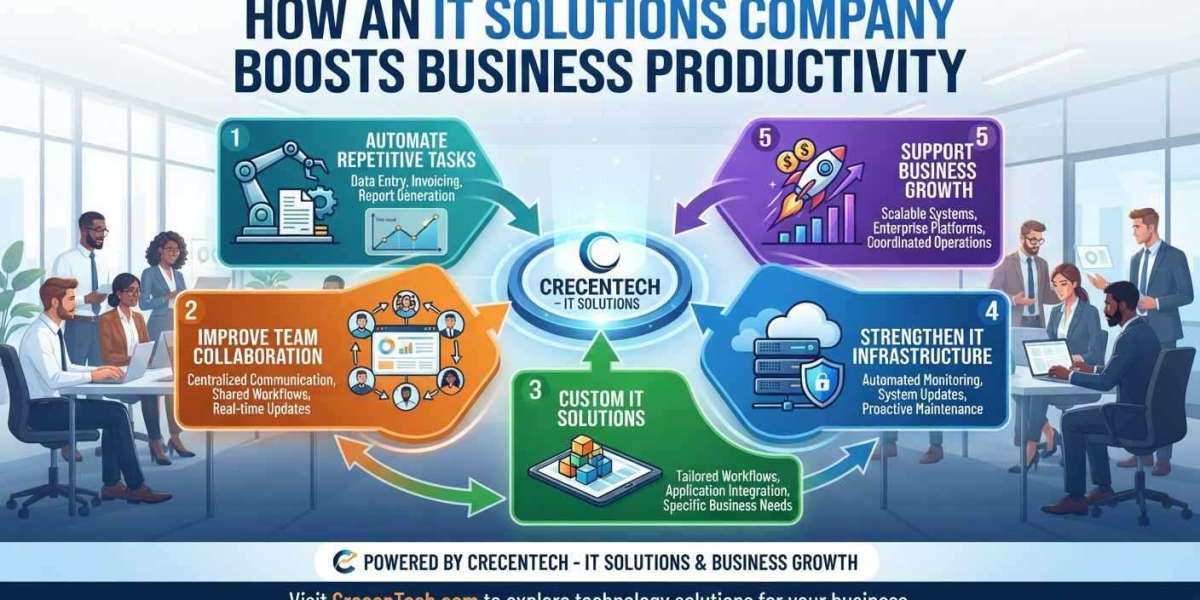
5 Ways an IT Solutions Company Improves Business Productivity
1. Automating Repetitive Business Tasks
Repetitive tasks consume valuable working hours, particularly in departments such as accounting, administration, sales, and human resources. Manual data entry, document processing, report generation, and email follow-ups can reduce the time available for more meaningful responsibilities.
An IT solutions provider can introduce robotic process automation and workflow management tools to handle these activities. For example, when a customer submits an online inquiry, an automated system can record the information, assign the request to the appropriate department, and send an acknowledgment email.
This approach reduces administrative delays, improves consistency, and helps employees manage larger workloads without unnecessary pressure.
2. Improving Team Collaboration and Communication
Poor communication between departments often creates delays and duplicated work. Employees may spend unnecessary time searching for documents, requesting updates, or managing information across different platforms.
Automation helps address these challenges through centralized communication systems, shared dashboards, automated notifications, and project management tools. Team members can access relevant information, monitor responsibilities, and receive updates without relying on constant manual communication.
For example, a project management platform can automatically notify team members when a task changes status or requires approval. This improves accountability and keeps projects moving efficiently.
3. Using Custom IT Solutions to Simplify Workflows
Every business has different operational requirements. Standard software may provide useful features, but it does not always address specific workflow challenges or integrate effectively with existing systems.
This is where Custom IT Solutions become valuable. Businesses can implement software designed around their processes, reporting requirements, and operational objectives.
For instance, a growing retail company might need an integrated system that connects inventory management, order processing, customer records, and billing. A customized solution can reduce information gaps and eliminate repeated data entry between departments.
Working with an experienced technology partner helps businesses select practical tools that solve existing problems rather than adding unnecessary complexity.
4. Strengthening IT Infrastructure and System Management
Business productivity also depends on reliable technology infrastructure. Slow networks, unexpected system failures, outdated applications, and software compatibility issues can interrupt daily operations.
An IT solutions provider can improve infrastructure management through automated monitoring, system updates, cloud management, and maintenance processes. These technologies help identify potential problems before they significantly affect business operations.
For example, automated monitoring tools can generate alerts when storage capacity becomes limited or a server experiences unusual activity. IT teams can investigate the issue and take corrective action before employees experience major disruptions.
Reliable infrastructure creates a more stable working environment and supports consistent business performance.
5. Supporting Enterprise IT Solutions and Business Growth
As organizations expand, their technology requirements become more complex. Managing multiple departments, locations, employees, and applications requires systems that can handle increasing workloads.
Enterprise IT Solutions help organizations coordinate large-scale operations through integrated platforms, automated reporting, enterprise resource planning, and advanced data management.
For example, a company operating across several locations can use centralized software to monitor inventory, track employee activities, manage customer information, and generate business reports. Automated processes ensure that different departments work with consistent information.
According to McKinsey's research on automation, successful automation requires systematic implementation, strategic planning, and involvement from IT teams.
Practical Steps to Introduce Automation Successfully
Businesses should begin by identifying processes that consume significant employee time or frequently create operational errors. Reviewing existing workflows helps determine which activities are suitable for automation and where improvements can deliver measurable value.
Next, organizations should establish clear objectives. These might include reducing invoice processing time, improving customer response rates, minimizing data entry errors, or simplifying employee onboarding.
Choosing compatible technology is equally important. Automation tools should integrate with existing business applications, protect important information, and support future requirements. Employees should also receive appropriate training so they understand how automated systems work and how their responsibilities may change.
Finally, businesses should regularly evaluate automation performance using practical measurements such as processing time, error rates, operating costs, and employee productivity.
Conclusion
Automation is becoming an important part of modern business operations because it helps organizations reduce repetitive work, improve communication, and make better use of available resources. From customized workflows to advanced infrastructure management, an experienced IT Solutions Company can help businesses introduce technology that supports efficiency and sustainable growth.
Companies looking to modernize their operations should explore reliable technology partners that understand their goals and operational challenges. CrecenTech helps businesses explore modern technology approaches, including ai solutions for business, to support digital transformation and improve operational efficiency. Visit CrecenTech to explore technology solutions that can support your business growth.
Frequently Asked Questions
1. How does an IT Solutions Company improve business productivity?
An IT Solutions Company improves productivity by implementing automation tools, optimizing workflows, integrating business applications, and improving IT infrastructure. These improvements reduce manual work and help employees focus on higher-value responsibilities.
2. What business processes can be automated?
Businesses can automate invoice processing, appointment scheduling, customer notifications, employee onboarding, data entry, inventory updates, reporting, and approval workflows. The best processes to automate are usually repetitive, time-consuming, and rule-based.
3. What are the benefits of Custom IT Solutions for businesses?
Custom IT Solutions help businesses address specific operational challenges through software designed around their requirements. They can improve application integration, simplify workflows, enhance reporting, and provide flexibility as business needs change.
4. How do Enterprise IT Solutions support large organizations?
Enterprise IT Solutions connect different departments through centralized platforms, integrated applications, automated reporting, and scalable infrastructure. They help large organizations manage complex operations while improving communication and information accuracy.
5. Is business automation suitable for small businesses?
Yes. Small businesses can benefit from automation by reducing administrative workloads, managing customer inquiries, automating billing, and organizing daily operations. They can begin with affordable tools and expand their automation capabilities as the business grows.
6. How does automation reduce business operating costs?
Automation reduces operating costs by minimizing repetitive manual work, reducing avoidable errors, improving resource allocation, and speeding up routine processes. It also allows employees to dedicate more time to activities that contribute directly to business growth.
7. How can businesses choose the right IT automation solutions?
Businesses should evaluate their existing workflows, identify operational challenges, establish clear objectives, and consider software compatibility, security, scalability, and implementation costs. Working with an experienced technology provider can help identify suitable solutions.